"I do not know the filename."
With SFX Stacks
Describe the sound in plain language, search by meaning or metadata, and get into your library without remembering how the file was named.
SFX Stacks
Search by meaning, find similar sounds, preview waveforms, and export useful clips from your own local sound libraries.
Free download. No account. No credit card. Fully local.
Built for stuck moments
SFX Stacks gives you another way through your own library when filenames, folders, and memory are not getting you to the right sound fast enough.
With SFX Stacks
Describe the sound in plain language, search by meaning or metadata, and get into your library without remembering how the file was named.
With SFX Stacks
Start from a useful sound or reference file and move into nearby options from your own local library.
With SFX Stacks
Let AI take another path through your library when you are stuck. Search by meaning or similarity to surface nearby options, unexpected matches, and the kind of happy accidents folders rarely give you.
With SFX Stacks
Preview the waveform, listen quickly, and export the section you actually want to use.
Local-first by default
SFX Stacks is built around local sound libraries and local AI processing. Your audio files stay on your computer, and the AI model runs on your machine.
SFX Stacks works with the folders you already have and builds its search index locally. You do not need to move your library into a cloud platform.
Search and analysis run against your local library index. After setup, the core search, preview, and export workflow can keep working without an internet connection.
Your sounds, filenames, folder paths, metadata, embeddings, and library data stay local. They are used for your own library workflow, not uploaded to train AI models or generate sounds.
Inside the app
Search by meaning, preview results, inspect details, clip the useful part, and branch into similarity search to uncover nearby options you would not have searched for directly.
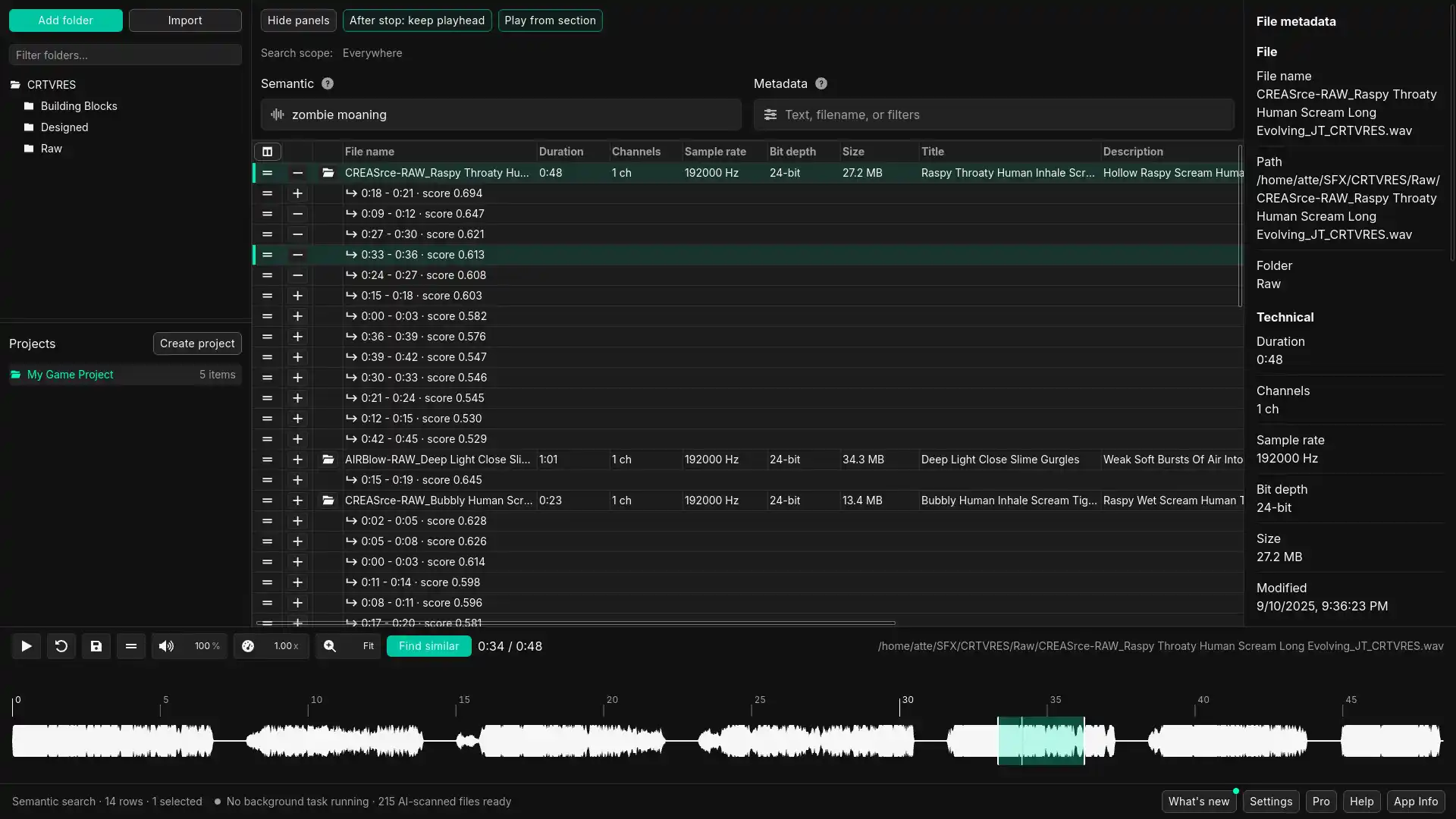
Add your existing sound libraries and work with the structure you already have. No library migration, cloud workspace, or folder cleanup required before you start.
Use plain language when the filename does not help, or narrow results with metadata when you need more control.
Use similarity search to follow useful results into variations, related sounds, and unexpected matches from your own library.
Listen quickly, inspect the waveform, and export the usable part without dragging entire files around just to test one useful section.
Use AI-assisted suggestions for track titles, descriptions, UCS, and keywords, edit metadata fields, use bulk cleanup tools, and write approved metadata without leaving SFX Stacks.
Metadata beta
Use AI-assisted suggestions for track titles, descriptions, UCS, and keywords, then review, edit, bulk clean, and write approved metadata back to audio files.
Generate starting points from your indexed files, existing metadata, filenames, similar sounds, UCS data, and current edits.
Edit single files, apply saved suggestions, set one field across selected files, or search and replace text across local metadata drafts before writing.
Approved changes are written as embedded audio metadata, with a backup created before each write. The goal is to keep cleaned-up libraries useful in other audio, library, and post-production tools where supported.
What users say
Sound designers are already using SFX Stacks to get into their own libraries from a different angle, find usable source faster, and keep working when the obvious route stops helping.

“SFX Stacks is a solid, cost-effective, no-fuss tool that also saves one screen real estate. A new angle of entry when diving into sound library searches has proved both beneficial, and yielding slightly - yet noticeably - different results. Easy to recommend.”
Tommi Hartikainen
“SFX Stacks has quickly become a staple in my sound design workflow. I know my libraries like the back of my hand, yet contextual search always returns some unexpected results that lead me down new and interesting creative paths. Great as both an everyday tool, and something to reach for when you're stuck.”
Jonathan Miller
“It really helps me start conceptualizing sound because it gives me great results right from the start. After a semantic search, I expand my options in a particular direction by performing a similarity search. At this point I have already populated my timeline with lots of usable source. The fact that I can also start a regular filename/metadata search and then similarity search over it is just the icing on the cake.”
Mauro Aramburu
Try it with your own sounds
No account. No credit card. No registration. The fastest way to judge SFX Stacks is to try it against the folders and sounds you already know.
Focused desktop workflow
Use SFX Stacks full screen when you are working through a library, or keep it tucked into the corner when you need a fast search beside your DAW, editor, or other audio tools.
Use the app as a wider library workspace when you are browsing sources, comparing results, reviewing metadata context, and preparing sounds.
Keep SFX Stacks tucked into the corner of your screen when you just need to search, preview, and grab a useful sound quickly.
Whether it is full screen or sitting beside your other tools, the workflow stays built around the folders and files on your machine.
Pricing
Free lets you try the local AI layer with your own folders. Pro gives larger result sets, projects, reference-file similarity search, and Metadata access during beta.
$0
Use the core local workflow without an account or credit card.
$99 + VAT
One-time license with updates included for larger libraries, Pro workflows, and Metadata access during beta.
$99 + VAT
Planned separate module after beta for AI-assisted metadata suggestions, manual edits, bulk cleanup, and embedded metadata writing.
| Feature | Free | Pro |
|---|---|---|
| AI and metadata search | Included | Included |
| Search results | Up to 10 | Up to 200 |
| Similarity search from results | One-step search | Unlimited follow-ups |
| Reference-file similarity search | - | Included |
| Preview and waveform export | Included | Included |
| REAPER spotting | - | Included |
| Projects | - | Included |
| Metadata beta | - | Included during beta |
| Folder tree browsing | Included | Included |
| Account required | No | No |
| License activations | - | 2 activations |
Ready to try it
Download SFX Stacks for free, add a local folder, and test whether it helps you find, preview, and prepare usable sounds faster.